
Introduction
In the specialized field of Amateur Radio software, development has traditionally been tied to the physical presence of hardware. To build, test, or refine an application, a developer usually needs a radio transceiver sitting on their desk, connected via a series of cables and interfaces. This hardware-centric workflow, while functional, introduces significant friction. The U2.Emulator was created to break this dependency, offering a virtualized alternative that streamlines the development process within the U2.RemoteSuite ecosystem.
The Purpose of a Virtual Radio
The core idea behind U2.Emulator is simple: if the software expects a radio to be there, why not provide a digital one that behaves exactly like the real thing? By simulating the interaction between the computer and the radio, the emulator serves several high-level purposes:
- Unlocking Development Anywhere: One of the greatest hurdles in radio software is that you cannot easily work on it while traveling or away from your station. The emulator provides a “radio-in-a-box” that lives entirely on the computer, making development possible in any environment.
- Standardizing the Testing Environment: Physical radios can have varying configurations, firmware versions, and unexpected hardware quirks. The emulator provides a stable, predictable baseline. When a bug is found, the team can be certain it stems from the software logic rather than a loose cable or a specific hardware revision.
- Protecting Expensive Equipment: Continuous automated testing—especially during the early stages of a project—can involve sending thousands of commands to a radio in a very short time. Using an emulator prevents unnecessary wear and tear on expensive physical transceivers.
- Simplifying Collaboration: Not every contributor to an open-source or team project owns the specific radio model being targeted. The emulator levels the playing field, allowing anyone with a computer to contribute to the codebase without a significant financial investment in hardware.
A Seamless User Experience
While the underlying mechanisms of the emulator are complex, the user experience is designed to be intuitive and transparent. The goal is to make the transition between the emulator and a real radio as seamless as possible.
Flexible Connectivity
One of the primary needs addressed by the emulator is the simplification of the “connection” process. Traditionally, connecting a radio to a computer requires specific drivers and virtual port software. The emulator bypasses these complications by allowing the software to communicate over standard internal computer networks. This “wireless” connection between the application and its virtual radio eliminates the need for third-party tools and complex driver installations, making the initial setup significantly faster for new users and developers.
Real-Time Visual Feedback
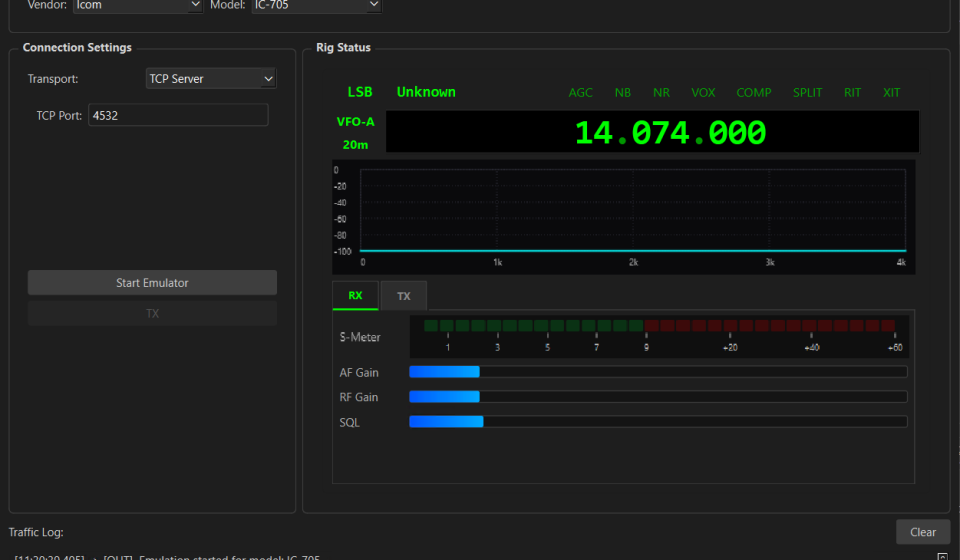
The emulator isn’t just a background process; it provides a visual representation of what the “radio” is doing. If the main control software changes the frequency or switches the operating mode, the emulator’s interface reflects that change instantly. This visual confirmation is vital for understanding how the software interacts with the equipment, providing a clear window into the communication flow that would otherwise be invisible.
Meeting the Developer’s Needs
The development of U2.Emulator was a direct response to practical challenges encountered during the growth of the U2.RemoteSuite.
The most pressing need was reliability. In a complex system, it is essential to isolate variables. By using an emulator, developers can confirm that their control logic is sound before ever connecting to a physical rig. This “safety first” approach leads to more robust software and fewer “surprises” when the code finally meets real hardware.
Another key need was versatility. The emulator can be configured to mimic the behavior of different brands and generations of radios. This allows the suite to be tested against a wide range of simulated equipment, ensuring broad compatibility and a consistent experience for users, regardless of which radio they eventually choose to connect.
Conclusion
The U2.Emulator represents a shift in how we approach radio software. By virtualizing the hardware bench, we have created a more accessible, stable, and flexible environment for innovation. It is no longer just a tool for testing; it is a fundamental part of the workflow that ensures the U2.RemoteSuite remains a high-quality, reliable choice for the Amateur Radio community. As the project grows, the virtual radio will continue to be an essential bridge between the code we write and the hardware we love.